Speak to our specialist sales team  |  0151 372 7766  |  in**@**************co.uk

Public sector & education POs accepted

What Is a Video Wall? LCD vs LED, Pixel Pitch, Brightness & Controllers Explained

A video wall is a large-format display system made up of multiple display panels, LED modules or other display technologies working together as one visual canvas.

Today, video walls are used across corporate offices, retail environments, hospitality venues, public-sector buildings, control rooms, entertainment spaces and live events. Depending on the application, a video wall might consist of tiled LCD panels or a seamless direct-view LED (DV-LED) display.

But choosing the right technology involves more than deciding how large you want the screen to be.

Pixel pitch, viewing distance, brightness, resolution, content sources, processing, room conditions, maintenance and budget can all influence the final result.

In this guide, we’ll explain the key video wall technologies and terminology you need to understand before specifying a system.

What Is a Video Wall?

A video wall is a collection of individual displays arranged together to create one larger display surface.

The displays can operate as one large image, show different content in separate areas, or combine multiple sources across the wall.

Video walls can be built using several technologies, including:

  • LCD video walls

  • Direct-view LED (DV-LED) video walls

  • OLED displays

  • Projection systems

  • Rear-projection systems

For most modern commercial applications, LCD and direct-view LED are the two technologies most likely to be considered.

The right choice depends on the environment, viewing distance, screen size, content, brightness requirements and budget.

Video Wall Solutions

What Is Direct-View LED?

Direct-view LED, commonly abbreviated to DV-LED or DVLED, is a display technology where the LEDs themselves produce the image.

Unlike an LCD display, there is no separate LCD panel and backlight forming the image. Instead, thousands or millions of individual LEDs are arranged into modules and cabinets to create the display surface.

One of the biggest advantages of direct-view LED is that there are no conventional bezels between panels. LED cabinets and modules can be assembled into a large, continuous visual surface.

Depending on the product and installation, direct-view LED can also be used to create unusual screen dimensions, curved displays and creative architectural installations.

Direct-view LED is particularly useful when you need:

  • A large, seamless image

  • High brightness

  • A premium visual experience

  • Large or unusual screen dimensions

  • Close viewing distances with fine pixel pitch

  • Creative or architectural display shapes

  • High-impact digital signage

  • Immersive environments

  • Large corporate or hospitality displays

What Is an LED Video Wall?

An LED video wall is a video wall constructed from multiple LED modules and cabinets.

Each cabinet contains LED modules, power components and electronics that work together to produce part of the overall image. Multiple cabinets are then joined to create the required screen size and aspect ratio.

Because the display is modular, LED video walls can be designed in a wide variety of dimensions.

This is one of the reasons they are increasingly used for large-format applications where conventional LCD panels may become impractical.

A major distinction is that not every LED display is a direct-view LED display.

Many LCD screens are marketed as “LED TVs” or “LED displays” because they use LED backlighting. Direct-view LED is different: the LED pixels themselves create the image.
LED Video Walls

LCD vs LED

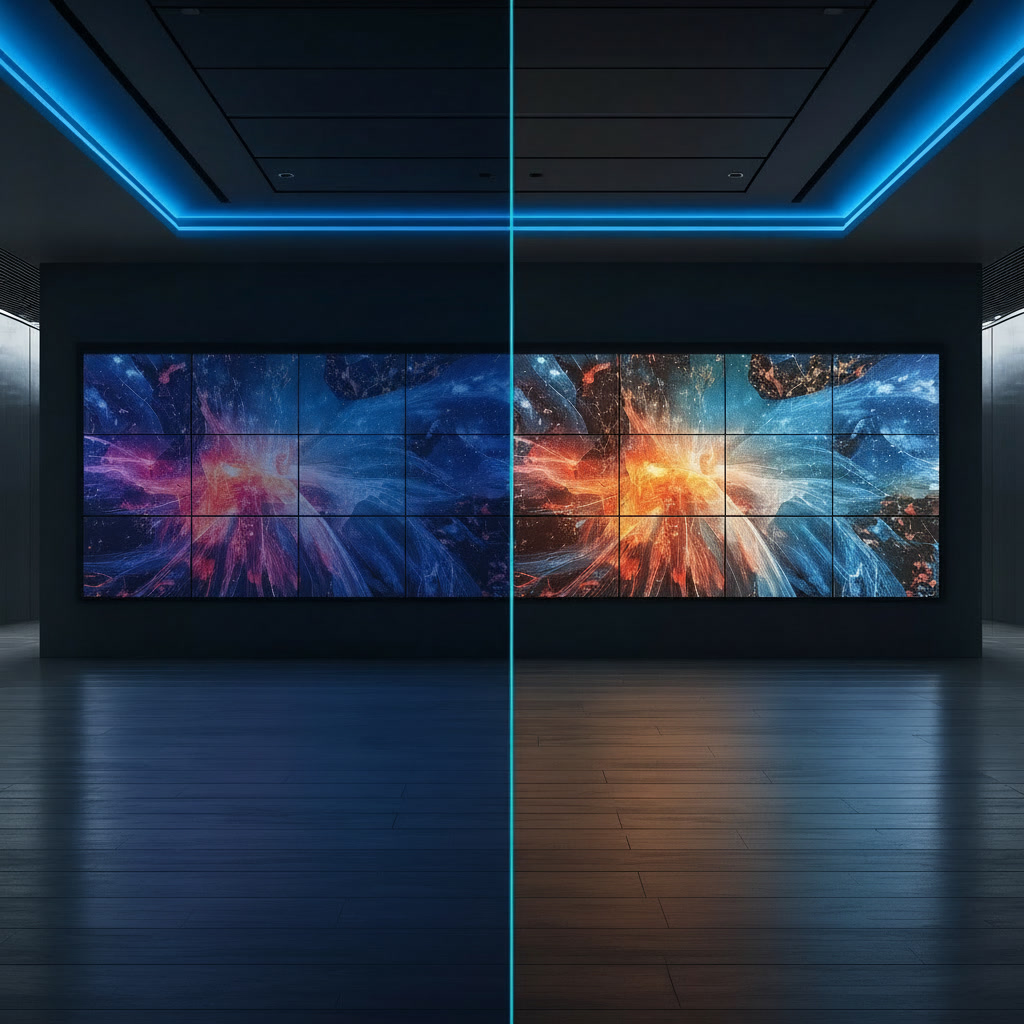
LCD Video Wall vs LED Video Wall

LCD and direct-view LED can both produce impressive results, but they work in fundamentally different ways.

FeatureLCD Video WallDirect-View LED
Display constructionMultiple LCD panelsModular LED cabinets/modules
Visible bezelsYesNo conventional panel bezels
Screen sizeBased on panel configurationHighly scalable
BrightnessGood for many indoor environmentsCan be specified for high brightness
Pixel pitchFixed by panelSelectable
Creative shapesMore limitedHighly flexible
Close viewingExcellent with suitable panelsExcellent with fine-pitch LED
Large seamless canvasPanel joins remain visibleVirtually seamless
Initial costOften lowerOften higher
MaintenanceIndividual panel replacementModule/cabinet component replacement


There is no universally correct technology.

LCD can make sense where budget, high pixel density and conventional rectangular panel formats are priorities. Direct-view LED becomes increasingly attractive as the required screen size, brightness, seamlessness and design flexibility increase.

The important thing is to select the technology around the application rather than simply choosing the newest or largest display available.

Why Choose Direct-View LED?

The biggest reason to choose DV-LED is often the ability to create a genuinely continuous display surface.

With an LCD video wall, the borders between individual panels create visible lines. These bezels can be acceptable for many applications, but they can interrupt text, graphics and video.

Direct-view LED removes those conventional panel bezels.

This can be particularly valuable for:

  • Brand environments

  • Retail displays

  • Immersive experiences

  • Corporate reception areas

  • Hospitality spaces

  • Event stages

  • Broadcast and virtual production

  • Large-format digital signage

  • Control and monitoring environments

LED can also be manufactured in much larger formats than a conventional single display, making it suitable for installations where the screen itself becomes part of the architecture.

What Is Pixel Pitch?

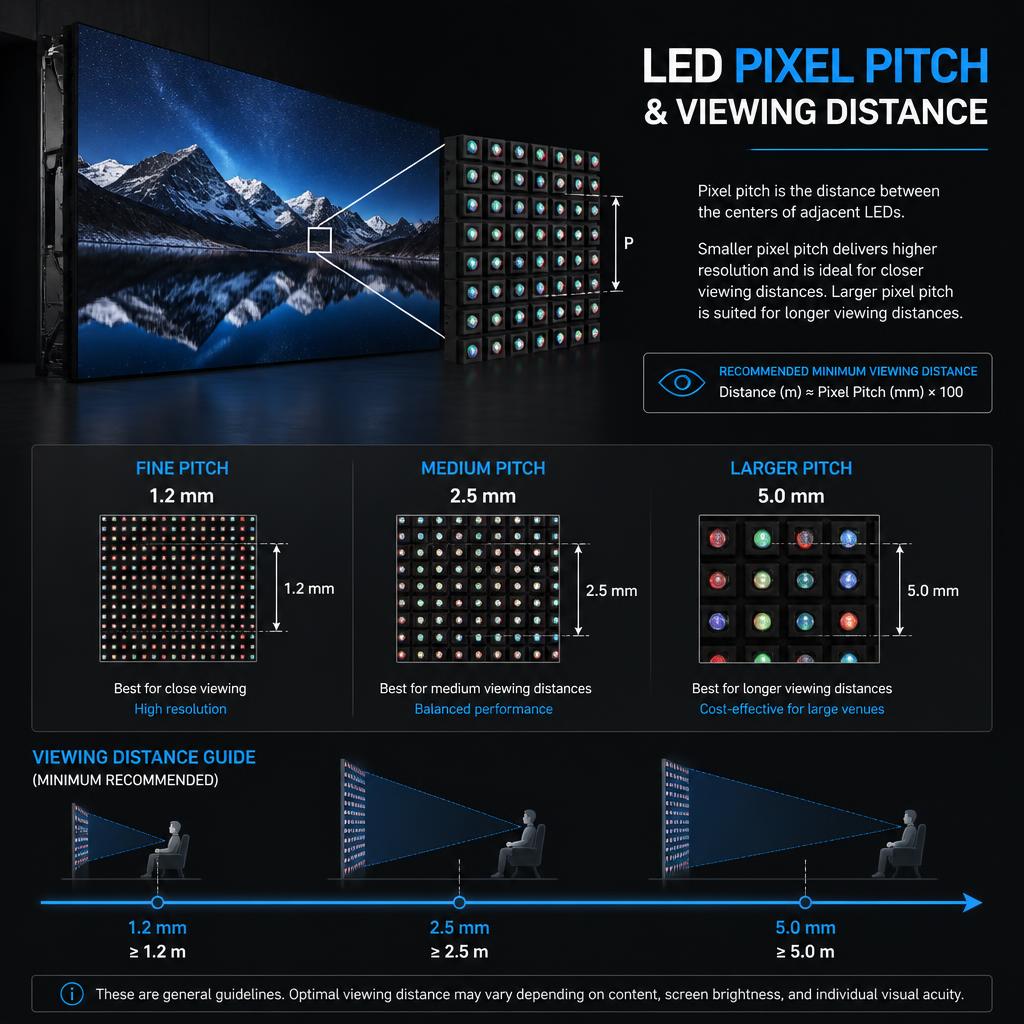
Pixel pitch is the distance between the centres of two adjacent pixels, normally measured in millimetres.

For example:

  • 0.9mm pixel pitch

  • 1.2mm pixel pitch

  • 1.5mm pixel pitch

  • 1.9mm pixel pitch

  • 2.5mm pixel pitch

  • 3.9mm pixel pitch

  • 4.8mm pixel pitch

  • 6mm pixel pitch

The smaller the pixel pitch, the closer together the pixels are and the greater the pixel density.

A smaller pitch generally allows viewers to sit closer to the display without being able to distinguish the individual pixel structure. A larger pitch is normally appropriate when viewers are further away.

Why Does Pixel Pitch Matter?

Imagine a large LED wall in a corporate boardroom.

People sitting two metres away may be able to see individual pixels if the pitch is too large. Choosing a finer pitch can produce a smoother and more detailed image.

Now consider a large LED display in a venue where the audience is 15 or 20 metres away.

A much larger pixel pitch may be perfectly suitable because viewers are further from the screen.

This is why choosing pixel pitch purely on the basis of “the smallest available pitch” is rarely the best approach.

The correct pixel pitch should be determined by factors such as:

  • Closest viewing distance

  • Average viewing distance

  • Screen dimensions

  • Content type

  • Text requirements

  • Camera usage

  • Desired image quality

  • Budget

The closer the audience, the more important fine pixel pitch becomes.
Pixel Pitch Infographic

Pixel Pitch and Viewing Distance

There is no single universal pixel-pitch formula that works for every display, content type and viewer.

As a starting point, manufacturers and display specialists often use viewing-distance guidelines to narrow down suitable pitches.

For example, a fine-pitch LED product may be appropriate for a boardroom where viewers sit close to the wall, while a larger-pitch product could be appropriate for a large event or public display viewed from considerably further away.

The important point is to design around the actual viewing environment, rather than selecting a pitch based solely on the screen’s size.

A display that looks excellent from 10 metres away may not be appropriate for a person sitting two metres from it.

What Is Brightness?

Display brightness is normally measured in nits, or candela per square metre (cd/m²).

Brightness requirements depend heavily on the environment.

An LED wall inside a dark auditorium does not need the same brightness as an outdoor display in direct sunlight.

Similarly, a corporate video wall positioned away from windows has different requirements from a retail display facing a large glazed frontage.

More brightness is not automatically better.

If a display is excessively bright for its environment, it can become uncomfortable to view and may make content appear harsh.

The objective is to select an appropriate operating brightness for the space.

How Bright Should an LED Video Wall Be?

There is no single brightness specification that is right for every LED wall.

The required brightness depends on:

  • Indoor or outdoor installation

  • Ambient lighting

  • Direct sunlight

  • Window proximity

  • Viewing distance

  • Screen size

  • Content

  • Camera requirements

  • Operating hours

For an indoor installation, the correct brightness may be substantially lower than that required for an outdoor LED display.

Brightness should also be considered alongside uniformity and calibration. A wall operating at an appropriate, consistent brightness can provide a better viewing experience than a wall running at maximum output with noticeable variations between modules.

How Do You Maintain Consistent Brightness on an LED Video Wall?

This is particularly important for large LED video walls and gaming, broadcast or other applications where the audience spends significant time looking at the screen.

LED modules naturally have small variations in brightness and colour. Over time, components can also age differently.

Professional LED systems therefore use calibration to help maintain consistency.

A typical calibration process can measure brightness and colour output across the display and apply correction data through the LED control system.

For a gaming LED video wall, a sensible maintenance strategy includes:

    1. Use matched LED modules from the outset.

    2. Commission and calibrate the wall after installation.

    3. Set an appropriate operating brightness rather than permanently running at maximum output.

    4. Monitor for visible brightness or colour differences.

    5. Keep calibration data backed up.

    6. Recalibrate after significant module replacements or repairs.

    7. Use consistent settings across the entire wall.

    8. Check the wall using appropriate test patterns as part of maintenance.

Professional calibration can also help when replacement modules need to be integrated into an existing wall.

For camera-facing applications, including broadcast, events and virtual production, refresh behaviour and camera compatibility also become important considerations.

What Is a Video Wall Controller?

A video wall controller is a device or system that manages how video sources are displayed across a video wall.

In its simplest form, a controller can take an incoming video source and distribute it across multiple displays.

More advanced controllers can:

  • Scale content

  • Split one source across multiple displays

  • Display multiple sources simultaneously

  • Create multiple viewing zones

  • Switch between sources

  • Manage different layouts

  • Control screen configurations

  • Support multiple input and output formats

For example, imagine a 3 × 3 LCD video wall.

A controller could take one 4K source and divide the image across all nine displays so that the audience sees one large image.

Alternatively, it could show multiple sources at once, with different feeds occupying different areas of the wall.

The controller is therefore a critical part of many professional video wall installations.

What Is a Video Wall Processor?

The terms video wall controller and video wall processor are sometimes used interchangeably, although the exact functionality varies between manufacturers and systems.

A processor generally refers to the hardware responsible for manipulating and managing video signals before they reach the display.

Depending on the system, this might include:

  • Scaling

  • Switching

  • Image composition

  • Multi-source processing

  • Signal conversion

  • Windowing

  • Image distribution

  • Resolution management

For a simple installation, the display may have some processing functionality built in.

For a complex control room, event system or large LED wall, dedicated processing hardware can become a critical part of the overall architecture.

The display itself is only one part of a professional video wall system.

Video Wall Controller vs Video Processor

A useful way of thinking about the terminology is:

Controller: manages where content goes and how the wall is configured.

Processor: manipulates, scales, combines and distributes video signals.

In real-world projects, these functions can overlap, and manufacturers may use different terminology for similar products.

The important thing is not the name on the specification sheet. It is understanding what the system needs to do.

Before specifying a processor or controller, consider:

  • How many sources are required?

  • How many outputs are required?

  • What resolutions are involved?

  • Is 4K required?

  • Are multiple sources displayed simultaneously?

  • Is content switching required?

  • Is the system used 24/7?

  • Does it need redundancy?

  • Will the wall be operated remotely?

  • Does the installation require integration with AV or control systems?

How Much Does a Video Wall Cost?

The cost of a video wall can vary substantially.

There is no meaningful single price for “a video wall” because the final system depends on the technology, size, specification and installation requirements.

The main cost factors include:

1. Display Technology

LCD video walls and direct-view LED have different cost structures.

LED typically carries a higher initial equipment cost, particularly when specifying fine pixel pitch, premium processing or specialised installation requirements.

2. Pixel Pitch

With direct-view LED, finer pixel pitches generally require greater pixel density and can increase the cost of the LED surface.

Choosing a smaller pitch than the application actually requires can therefore add unnecessary expense.

3. Screen Size

A larger display requires more panels or LED modules, as well as more structural, electrical and processing infrastructure.

4. Brightness

Higher-brightness products can be required for particularly bright environments and outdoor applications.

5. Processing

A simple single-source installation may require relatively straightforward processing.

A multi-source video wall with multiple windows, switching and control requirements can require considerably more sophisticated processing.

6. Mounting and Structure

The wall may require a dedicated mounting structure, floor support, wall reinforcement or specialist access system.

7. Installation

Professional installation includes much more than mounting the display.

It can involve:

  • Mechanical installation

  • Electrical requirements

  • Signal infrastructure

  • Configuration

  • Calibration

  • Testing

  • Commissioning

  • Integration

  • Training

8. Maintenance

A complete cost assessment should also consider servicing, spare modules, replacement components, calibration and long-term support.

For that reason, a good video wall quotation should be based on the complete system, rather than simply the price per panel or square metre.

Which Is Better: LCD or LED?

The better technology depends on the application.

LCD may be suitable when:

  • The wall is relatively small or medium-sized.

  • Budget is a significant consideration.

  • The installation uses a conventional rectangular format.

  • Very high pixel density is required at close viewing distances.

  • Visible bezels are acceptable.

Direct-view LED may be suitable when:

  • A seamless appearance is important.

  • The display needs to be very large.

  • High brightness is required.

  • The audience is relatively close and fine pixel pitch is appropriate.

  • The design requires unusual dimensions or shapes.

  • The display is intended to create a strong visual impact.

  • Long-term flexibility and scalability are important.

The decision should be based on the application rather than treating one technology as universally superior.

Where Are Video Walls Used?

Video walls have applications across a wide range of industries.

Corporate:

Corporate video walls can be used in:

  • Reception areas

  • Boardrooms

  • Experience centres

  • Collaboration spaces

  • Presentation environments

  • Brand installations

Retail:

Retail environments can use large-format displays for:

  • Digital signage

  • Product launches

  • Brand experiences

  • Window displays

  • Promotional content

  • Immersive environments

Hospitality:

Hotels, restaurants and venues can use video walls for:

  • Lobby installations

  • Digital artwork

  • Events

  • Entertainment

  • Wayfinding

  • Brand communication

Public Sector:

Video walls can support:

  • Information displays

  • Public communications

  • Transport environments

  • Emergency operations

  • Monitoring

  • Situational awareness

Events:

For live events, LED video walls can provide:

  • Stage backdrops

  • Main screens

  • IMAG displays

  • Sponsor branding

  • Content surfaces

  • Scenic installations

  • Immersive environments

What Should You Consider Before Buying a Video Wall?

Before choosing a display, answer these questions:

1. Where will it be installed?

Indoor, outdoor, semi-outdoor and window-facing installations have very different requirements.

2. How far away will viewers be?

This is one of the most important factors when selecting pixel pitch.

3. What will be displayed?

Text-heavy dashboards have different requirements from promotional video, gaming, live events or brand imagery.

4. How large does the wall need to be?

Screen size influences resolution, processing, power and structural requirements.

5. How bright is the environment?

Ambient light and sunlight can dramatically affect the appropriate brightness specification.

6. Will cameras be used?

Broadcast, events, virtual production and recorded content introduce additional considerations around refresh rate, scan behaviour and camera interaction.

7. How will content be controlled?

Consider sources, switching, scaling, multi-window layouts and remote control.

8. How will it be maintained?

Ask how modules are replaced, whether the system is front or rear serviceable, how calibration data is stored and what support is available.

9. What is the total project budget?

Allow for display hardware, processing, mounting, installation, cabling, commissioning and ongoing maintenance.

The Most Important Point: A Video Wall Is a System

It is tempting to think of a video wall as simply a very large screen.

In professional installations, it is much more than that.

The final result depends on the relationship between:

Display + Pixel Pitch + Brightness + Processing + Content + Installation + Calibration + Maintenance

Getting one element wrong can compromise the entire system.

For example, specifying an extremely fine pixel pitch does not automatically produce a better installation if viewers are several metres away. Similarly, selecting the brightest LED available does not necessarily produce the best image if the wall is installed in a relatively dark room.

The objective should always be to specify the right technology for the environment and the intended experience.

Planning a Video Wall?

Choosing a video wall is ultimately about matching the technology to the space, content and audience.

Whether you are considering an LCD video wall, fine-pitch DV-LED, a large-format LED installation or a more complex multi-source display system, the specification should be developed around the real-world requirements of the project.

FutureVisuals can help you explore the right video wall solution for your environment, from technology selection and pixel pitch through to processing and installation.

Home / Blog / What Is a Video Wall? LCD vs LED, Pixel Pitch, Brightness & Controllers Explained
Blogs30 Sep 2026

What Is a Video Wall? LCD vs LED, Pixel Pitch, Brightness & Controllers Explained

A video wall is a large-format display system made up of multiple display panels, LED modules or other display technologies working together as one visual canvas.

Today, video walls are used across corporate offices, retail environments, hospitality venues, public-sector buildings, control rooms, entertainment spaces and live events. Depending on the application, a video wall might consist of tiled LCD panels or a seamless direct-view LED (DV-LED) display.

But choosing the right technology involves more than deciding how large you want the screen to be.

Pixel pitch, viewing distance, brightness, resolution, content sources, processing, room conditions, maintenance and budget can all influence the final result.

In this guide, we’ll explain the key video wall technologies and terminology you need to understand before specifying a system.

What Is a Video Wall?

A video wall is a collection of individual displays arranged together to create one larger display surface.

The displays can operate as one large image, show different content in separate areas, or combine multiple sources across the wall.

Video walls can be built using several technologies, including:

  • LCD video walls

  • Direct-view LED (DV-LED) video walls

  • OLED displays

  • Projection systems

  • Rear-projection systems

For most modern commercial applications, LCD and direct-view LED are the two technologies most likely to be considered.

The right choice depends on the environment, viewing distance, screen size, content, brightness requirements and budget.

Video Wall Solutions

What Is Direct-View LED?

Direct-view LED, commonly abbreviated to DV-LED or DVLED, is a display technology where the LEDs themselves produce the image.

Unlike an LCD display, there is no separate LCD panel and backlight forming the image. Instead, thousands or millions of individual LEDs are arranged into modules and cabinets to create the display surface.

One of the biggest advantages of direct-view LED is that there are no conventional bezels between panels. LED cabinets and modules can be assembled into a large, continuous visual surface.

Depending on the product and installation, direct-view LED can also be used to create unusual screen dimensions, curved displays and creative architectural installations.

Direct-view LED is particularly useful when you need:

  • A large, seamless image

  • High brightness

  • A premium visual experience

  • Large or unusual screen dimensions

  • Close viewing distances with fine pixel pitch

  • Creative or architectural display shapes

  • High-impact digital signage

  • Immersive environments

  • Large corporate or hospitality displays

What Is an LED Video Wall?

An LED video wall is a video wall constructed from multiple LED modules and cabinets.

Each cabinet contains LED modules, power components and electronics that work together to produce part of the overall image. Multiple cabinets are then joined to create the required screen size and aspect ratio.

Because the display is modular, LED video walls can be designed in a wide variety of dimensions.

This is one of the reasons they are increasingly used for large-format applications where conventional LCD panels may become impractical.

A major distinction is that not every LED display is a direct-view LED display.

Many LCD screens are marketed as “LED TVs” or “LED displays” because they use LED backlighting. Direct-view LED is different: the LED pixels themselves create the image.

LED Video Walls

LCD vs LED

LCD Video Wall vs LED Video Wall

LCD and direct-view LED can both produce impressive results, but they work in fundamentally different ways.

FeatureLCD Video WallDirect-View LED
Display constructionMultiple LCD panelsModular LED cabinets/modules
Visible bezelsYesNo conventional panel bezels
Screen sizeBased on panel configurationHighly scalable
BrightnessGood for many indoor environmentsCan be specified for high brightness
Pixel pitchFixed by panelSelectable
Creative shapesMore limitedHighly flexible
Close viewingExcellent with suitable panelsExcellent with fine-pitch LED
Large seamless canvasPanel joins remain visibleVirtually seamless
Initial costOften lowerOften higher
MaintenanceIndividual panel replacementModule/cabinet component replacement


There is no universally correct technology.

LCD can make sense where budget, high pixel density and conventional rectangular panel formats are priorities. Direct-view LED becomes increasingly attractive as the required screen size, brightness, seamlessness and design flexibility increase.

The important thing is to select the technology around the application rather than simply choosing the newest or largest display available.

Why Choose Direct-View LED?

The biggest reason to choose DV-LED is often the ability to create a genuinely continuous display surface.

With an LCD video wall, the borders between individual panels create visible lines. These bezels can be acceptable for many applications, but they can interrupt text, graphics and video.

Direct-view LED removes those conventional panel bezels.

This can be particularly valuable for:

  • Brand environments

  • Retail displays

  • Immersive experiences

  • Corporate reception areas

  • Hospitality spaces

  • Event stages

  • Broadcast and virtual production

  • Large-format digital signage

  • Control and monitoring environments

LED can also be manufactured in much larger formats than a conventional single display, making it suitable for installations where the screen itself becomes part of the architecture.

What Is Pixel Pitch?

Pixel pitch is the distance between the centres of two adjacent pixels, normally measured in millimetres.

For example:

  • 0.9mm pixel pitch

  • 1.2mm pixel pitch

  • 1.5mm pixel pitch

  • 1.9mm pixel pitch

  • 2.5mm pixel pitch

  • 3.9mm pixel pitch

  • 4.8mm pixel pitch

  • 6mm pixel pitch

The smaller the pixel pitch, the closer together the pixels are and the greater the pixel density.

A smaller pitch generally allows viewers to sit closer to the display without being able to distinguish the individual pixel structure. A larger pitch is normally appropriate when viewers are further away.

Why Does Pixel Pitch Matter?

Imagine a large LED wall in a corporate boardroom.

People sitting two metres away may be able to see individual pixels if the pitch is too large. Choosing a finer pitch can produce a smoother and more detailed image.

Now consider a large LED display in a venue where the audience is 15 or 20 metres away.

A much larger pixel pitch may be perfectly suitable because viewers are further from the screen.

This is why choosing pixel pitch purely on the basis of “the smallest available pitch” is rarely the best approach.

The correct pixel pitch should be determined by factors such as:

  • Closest viewing distance

  • Average viewing distance

  • Screen dimensions

  • Content type

  • Text requirements

  • Camera usage

  • Desired image quality

  • Budget

The closer the audience, the more important fine pixel pitch becomes.

Pixel Pitch Infographic

Pixel Pitch and Viewing Distance

There is no single universal pixel-pitch formula that works for every display, content type and viewer.

As a starting point, manufacturers and display specialists often use viewing-distance guidelines to narrow down suitable pitches.

For example, a fine-pitch LED product may be appropriate for a boardroom where viewers sit close to the wall, while a larger-pitch product could be appropriate for a large event or public display viewed from considerably further away.

The important point is to design around the actual viewing environment, rather than selecting a pitch based solely on the screen’s size.

A display that looks excellent from 10 metres away may not be appropriate for a person sitting two metres from it.

What Is Brightness?

Display brightness is normally measured in nits, or candela per square metre (cd/m²).

Brightness requirements depend heavily on the environment.

An LED wall inside a dark auditorium does not need the same brightness as an outdoor display in direct sunlight.

Similarly, a corporate video wall positioned away from windows has different requirements from a retail display facing a large glazed frontage.

More brightness is not automatically better.

If a display is excessively bright for its environment, it can become uncomfortable to view and may make content appear harsh.

The objective is to select an appropriate operating brightness for the space.

How Bright Should an LED Video Wall Be?

There is no single brightness specification that is right for every LED wall.

The required brightness depends on:

  • Indoor or outdoor installation

  • Ambient lighting

  • Direct sunlight

  • Window proximity

  • Viewing distance

  • Screen size

  • Content

  • Camera requirements

  • Operating hours

For an indoor installation, the correct brightness may be substantially lower than that required for an outdoor LED display.

Brightness should also be considered alongside uniformity and calibration. A wall operating at an appropriate, consistent brightness can provide a better viewing experience than a wall running at maximum output with noticeable variations between modules.

How Do You Maintain Consistent Brightness on an LED Video Wall?

This is particularly important for large LED video walls and gaming, broadcast or other applications where the audience spends significant time looking at the screen.

LED modules naturally have small variations in brightness and colour. Over time, components can also age differently.

Professional LED systems therefore use calibration to help maintain consistency.

A typical calibration process can measure brightness and colour output across the display and apply correction data through the LED control system.

For a gaming LED video wall, a sensible maintenance strategy includes:

    1. Use matched LED modules from the outset.

    2. Commission and calibrate the wall after installation.

    3. Set an appropriate operating brightness rather than permanently running at maximum output.

    4. Monitor for visible brightness or colour differences.

    5. Keep calibration data backed up.

    6. Recalibrate after significant module replacements or repairs.

    7. Use consistent settings across the entire wall.

    8. Check the wall using appropriate test patterns as part of maintenance.

Professional calibration can also help when replacement modules need to be integrated into an existing wall.

For camera-facing applications, including broadcast, events and virtual production, refresh behaviour and camera compatibility also become important considerations.

What Is a Video Wall Controller?

A video wall controller is a device or system that manages how video sources are displayed across a video wall.

In its simplest form, a controller can take an incoming video source and distribute it across multiple displays.

More advanced controllers can:

  • Scale content

  • Split one source across multiple displays

  • Display multiple sources simultaneously

  • Create multiple viewing zones

  • Switch between sources

  • Manage different layouts

  • Control screen configurations

  • Support multiple input and output formats

For example, imagine a 3 × 3 LCD video wall.

A controller could take one 4K source and divide the image across all nine displays so that the audience sees one large image.

Alternatively, it could show multiple sources at once, with different feeds occupying different areas of the wall.

The controller is therefore a critical part of many professional video wall installations.

What Is a Video Wall Processor?

The terms video wall controller and video wall processor are sometimes used interchangeably, although the exact functionality varies between manufacturers and systems.

A processor generally refers to the hardware responsible for manipulating and managing video signals before they reach the display.

Depending on the system, this might include:

  • Scaling

  • Switching

  • Image composition

  • Multi-source processing

  • Signal conversion

  • Windowing

  • Image distribution

  • Resolution management

For a simple installation, the display may have some processing functionality built in.

For a complex control room, event system or large LED wall, dedicated processing hardware can become a critical part of the overall architecture.

The display itself is only one part of a professional video wall system.

Video Wall Controller vs Video Processor

A useful way of thinking about the terminology is:

Controller: manages where content goes and how the wall is configured.

Processor: manipulates, scales, combines and distributes video signals.

In real-world projects, these functions can overlap, and manufacturers may use different terminology for similar products.

The important thing is not the name on the specification sheet. It is understanding what the system needs to do.

Before specifying a processor or controller, consider:

  • How many sources are required?

  • How many outputs are required?

  • What resolutions are involved?

  • Is 4K required?

  • Are multiple sources displayed simultaneously?

  • Is content switching required?

  • Is the system used 24/7?

  • Does it need redundancy?

  • Will the wall be operated remotely?

  • Does the installation require integration with AV or control systems?

How Much Does a Video Wall Cost?

The cost of a video wall can vary substantially.

There is no meaningful single price for “a video wall” because the final system depends on the technology, size, specification and installation requirements.

The main cost factors include:

1. Display Technology

LCD video walls and direct-view LED have different cost structures.

LED typically carries a higher initial equipment cost, particularly when specifying fine pixel pitch, premium processing or specialised installation requirements.

2. Pixel Pitch

With direct-view LED, finer pixel pitches generally require greater pixel density and can increase the cost of the LED surface.

Choosing a smaller pitch than the application actually requires can therefore add unnecessary expense.

3. Screen Size

A larger display requires more panels or LED modules, as well as more structural, electrical and processing infrastructure.

4. Brightness

Higher-brightness products can be required for particularly bright environments and outdoor applications.

5. Processing

A simple single-source installation may require relatively straightforward processing.

A multi-source video wall with multiple windows, switching and control requirements can require considerably more sophisticated processing.

6. Mounting and Structure

The wall may require a dedicated mounting structure, floor support, wall reinforcement or specialist access system.

7. Installation

Professional installation includes much more than mounting the display.

It can involve:

  • Mechanical installation

  • Electrical requirements

  • Signal infrastructure

  • Configuration

  • Calibration

  • Testing

  • Commissioning

  • Integration

  • Training

8. Maintenance

A complete cost assessment should also consider servicing, spare modules, replacement components, calibration and long-term support.

For that reason, a good video wall quotation should be based on the complete system, rather than simply the price per panel or square metre.

Which Is Better: LCD or LED?

The better technology depends on the application.

LCD may be suitable when:

  • The wall is relatively small or medium-sized.

  • Budget is a significant consideration.

  • The installation uses a conventional rectangular format.

  • Very high pixel density is required at close viewing distances.

  • Visible bezels are acceptable.

Direct-view LED may be suitable when:

  • A seamless appearance is important.

  • The display needs to be very large.

  • High brightness is required.

  • The audience is relatively close and fine pixel pitch is appropriate.

  • The design requires unusual dimensions or shapes.

  • The display is intended to create a strong visual impact.

  • Long-term flexibility and scalability are important.

The decision should be based on the application rather than treating one technology as universally superior.

Where Are Video Walls Used?

Video walls have applications across a wide range of industries.

Corporate:

Corporate video walls can be used in:

  • Reception areas

  • Boardrooms

  • Experience centres

  • Collaboration spaces

  • Presentation environments

  • Brand installations

Retail:

Retail environments can use large-format displays for:

  • Digital signage

  • Product launches

  • Brand experiences

  • Window displays

  • Promotional content

  • Immersive environments

Hospitality:

Hotels, restaurants and venues can use video walls for:

  • Lobby installations

  • Digital artwork

  • Events

  • Entertainment

  • Wayfinding

  • Brand communication

Public Sector:

Video walls can support:

  • Information displays

  • Public communications

  • Transport environments

  • Emergency operations

  • Monitoring

  • Situational awareness

Events:

For live events, LED video walls can provide:

  • Stage backdrops

  • Main screens

  • IMAG displays

  • Sponsor branding

  • Content surfaces

  • Scenic installations

  • Immersive environments

What Should You Consider Before Buying a Video Wall?

Before choosing a display, answer these questions:

1. Where will it be installed?

Indoor, outdoor, semi-outdoor and window-facing installations have very different requirements.

2. How far away will viewers be?

This is one of the most important factors when selecting pixel pitch.

3. What will be displayed?

Text-heavy dashboards have different requirements from promotional video, gaming, live events or brand imagery.

4. How large does the wall need to be?

Screen size influences resolution, processing, power and structural requirements.

5. How bright is the environment?

Ambient light and sunlight can dramatically affect the appropriate brightness specification.

6. Will cameras be used?

Broadcast, events, virtual production and recorded content introduce additional considerations around refresh rate, scan behaviour and camera interaction.

7. How will content be controlled?

Consider sources, switching, scaling, multi-window layouts and remote control.

8. How will it be maintained?

Ask how modules are replaced, whether the system is front or rear serviceable, how calibration data is stored and what support is available.

9. What is the total project budget?

Allow for display hardware, processing, mounting, installation, cabling, commissioning and ongoing maintenance.

The Most Important Point: A Video Wall Is a System

It is tempting to think of a video wall as simply a very large screen.

In professional installations, it is much more than that.

The final result depends on the relationship between:

Display + Pixel Pitch + Brightness + Processing + Content + Installation + Calibration + Maintenance

Getting one element wrong can compromise the entire system.

For example, specifying an extremely fine pixel pitch does not automatically produce a better installation if viewers are several metres away. Similarly, selecting the brightest LED available does not necessarily produce the best image if the wall is installed in a relatively dark room.

The objective should always be to specify the right technology for the environment and the intended experience.

Planning a Video Wall?

Choosing a video wall is ultimately about matching the technology to the space, content and audience.

Whether you are considering an LCD video wall, fine-pitch DV-LED, a large-format LED installation or a more complex multi-source display system, the specification should be developed around the real-world requirements of the project.

FutureVisuals can help you explore the right video wall solution for your environment, from technology selection and pixel pitch through to processing and installation.

Thinking about technology for your space?

Book a free demo

© 2026 FutureVisuals, a trading name of All Office Ltd. | Website by Crayon Digital